
Summarise With AI


Table of Contents
JEE Mains 2026 registrations are still ongoing with a deadline of 27th November 2025. All the eligible candidates are advised to visit the official website to register for the upcoming JEE Mains exam. However, it is crucial to adhere to the JEE Mains 2026 photo & signature guidelines as these minute details, if missed, can result in the disqualification of your application.
According to the latest NTA notification, the photo and signature upload guidelines for JEE Mains 2026 have been revised, and all candidates are required to follow these updated standards while submitting their documents. The NTA has implemented a strict verification system that automatically rejects any uploaded photograph or signature that does not match the prescribed format. Even minor discrepancies in the JEE Mains 2026 photo size or quality can result in the cancellation of the application. Candidates can check the updated JEE Mains 2026 photo and signature specifications, tools for resizing images, and steps to correct errors after uploading.
Pro Tip: Attempt This Free JEE Mock 👇

Why Accurate JEE Mains 2026 Photo and Signature Submission Matters?
Candidates must adhere to the JEE Mains 2026 photo and signature guidelines as per the NTA rules. This is highly crucial for them to appear in the exam. NTA uses these uploaded photographs and signatures to verify the identity of the candidate at multiple stages, which include:
- Registration approval
- Admit card issuance
- Entry at the exam centre
- Result declaration and scorecard printing
What Happens If You Do Not Adhere To The Guidelines?
- Application Rejection: The NTA’s automated system will instantly reject any application with photos or signatures that do not meet the prescribed JEE Main photo requirements 2026, along with the signature format. Also, if candidates fail to correct their application during the correction window, their application will be cancelled.
- Exam Day Issues: A blurry or mismatched photo can lead to entry denial at the examination centre, even if your registration was initially accepted.
- Document Verification Delays: An unclear or incorrect signature may delay document verification, potentially affecting your admission process.
- No Correction Opportunity: With stricter verification and limited correction windows, failing to submit accurate documents could result in permanent disqualification for the current session.
Also Check: JEE Mains 2026 Registration Started
Highlights For JEE Mains 2026 Photo & Signature Guidelines
Ensure that the candidates adhere to the format below, including the signature and photo specifications for JEE Mains 2026.
| Document | Specifications | File Size | Format |
| Photograph | Recent, colored, 80% face (without mask) visible, ears shown, white background | 10 KB – 200 KB | JPG/JPEG |
| Signature | Clear signature on white paper | 10 KB – 100 KB | JPG/JPEG |
JEE Mains 2026 Photo Guidelines
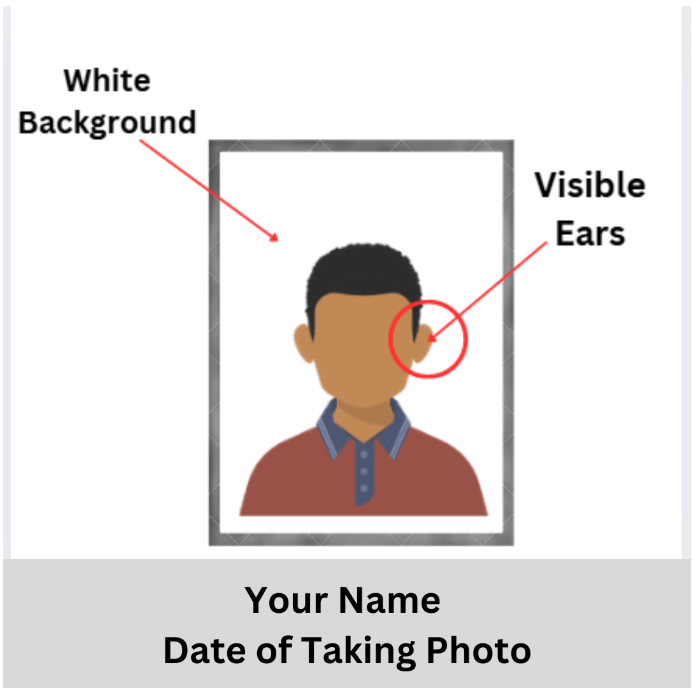
Candidates need to upload a recent passport-size colour photo with their face clearly visible (around 80% of the image), ears shown, and no mask. The background should be white. The file must be in JPG or JPEG format, named ‘Photograph’, and its size should range from 10 KB to 200 KB. Moreover, the dimension of the JEE Mains 2026 registration photo should be 3.5 x 4.5 cm.
JEE Mains 2026 Photo Resizer
Candidates appearing for JEE Mains 2026 must carefully adhere to the specified dimensions and size requirements when uploading their photograph. The application system will reject any JEE Mains 2026 registration photo that does not comply with the size limits set by the JEE Main guidelines. To help ensure accuracy, candidates can utilise various online tools that resize or convert images without compromising their quality. Popular options for resizing JEE Main photographs are listed below:
- Canva
- Adobe
- Reduce Images
- Image Resizer
- PicResize
JEE Mains 2026 Signature Guidelines
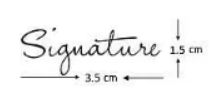
Candidates should upload their signature made on plain white paper. The image should be clear and saved in JPG or JPEG format, titled ‘Signature’, with a file size between 10 KB and 100 KB. When uploading the JEE Main signature PDF, candidates need to follow these guidelines:
- Sign on a plain white sheet using black or blue ink.
- Make sure the signature is neat and clearly visible.
- Save the file with the name ‘Signature’.
- Only JPG or JPEG file formats are allowed for upload.
- The file size should be between 10 KB and 100 KB.
JEE Mains Signature Resizer
Candidates must ensure that their JEE Mains 2026 signature file meets the specified size requirements. If the uploaded signature exceeds the allowed size range, the application portal will display an error message. To fix this, candidates can use any of the following tools to resize their JEE Main signature:
- Reduce Images
- Image Resizer
- PicResize
- Canva
- Adobe
Documents Required For JEE Mains 2026 Registration
Candidates need to be very careful while uploading all the JEE Mains 2025 registration documents. Check out the table below for the required documents for registration.
| Documents | Required Status | Format & Size |
| Class 10th Certificate | Mandatory | PDF format, 10 KB to 300 KB |
| Candidate’s Signature | Mandatory | JPG/JPEG format, 4 KB to 50 KB, 3.5 cm × 1.5 cm |
| PwD/PwBD Certificate | Applicable only for claiming PwD | PDF format, 10 KB to 300 KB |
| Passport-Size Photograph | Mandatory | JPG/JPEG format, 10 KB to 300 KB, 3.5 cm × 4.5 cm |
| Active Email ID & Mobile Number | Mandatory | N/A |
| Aadhaar Card / Valid ID Proof | Mandatory | Aadhaar authentication used |
| Payment Details | Mandatory | Online payment via Debit/Credit Card, Net Banking, UPI |
| Category Certificate (SC/ST/OBC-NCL/EWS) | Required if claiming a reservation | Certificate number, issuing authority, issue date (upload optional during registration) |
| Class 12 / Equivalent Exam Details | Mandatory | Pass year, board name, school details (upload not needed) |
Common Mistakes To Avoid While Uploading JEE Mains 2026 Photo & Signature
Many students face rejection due to issues with their uploaded documents. Make sure you avoid the following mistakes while submitting the JEE Mains 2026 photo & signature.
- Uploading Old Photographs: Only recent photos, not older than 6 months, should be uploaded. Older photos may not reflect your current appearance and will be rejected.
- Using Photos with Masks, Caps, or Sunglasses: Photos must clearly show your whole face, without any obstructions such as masks, caps, or sunglasses, to ensure proper identification.
- Uploading Selfies or Group Photos: A proper passport-size photo of a single person must be submitted. Selfies or group images are invalid and rejected.
- Submitting Blurred, Pixelated, or Rotated Images: Ensure your images are clear, high-resolution, correctly oriented, and not distorted or pixelated to avoid upload errors.
- Incorrect Background in Photos: The background must be a plain white colour. Coloured, dark, or patterned backgrounds are not acceptable and may result in rejection.
- Not Following Prescribed Size and Dimension: Photos should be 3.5 cm × 4.5 cm with a file size between 10 KB and 200 KB. Signatures must be 3.5 cm × 1.5 cm, sized 10 KB to 100 KB.
- Using Wrong File Formats: Only JPG or JPEG formats are accepted. PNG, PDF, or other formats will not be allowed.
- Improper File Naming: Files must be named exactly “Photograph” for the photo and “Signature” for the signature. Random or incorrect file names may cause technical issues.
- Signature in Capital Letters or Digital Fonts: Signatures must be handwritten in blue or black ink on white paper. Typed, digital font, or capitalised signatures are invalid.
- Using Image Filters or Editing Software: Avoid any photo editing, filters, brightness adjustments, or software enhancements. The photo and signature must be natural and unaltered for authenticity.
Do’s and Don’ts While Uploading JEE Mains 2026 Photo & Signature
| Do’s | Don’ts |
| Ensure your photo size is strictly between 10 KB and 200 KB | Uploading photos with heavy shadows or editing filters |
| Use a plain white background for photos and signatures | Submitting photos with coloured or tinted backgrounds |
| Upload a recent passport-size photo with 80% face visibility | Uploading sideways or rotated images |
| Sign with blue or black ink only | Cropping your signature too tightly or leaving too much blank space |
| Check image clarity before uploading | Uploading documents in ZIP, RAR, or unsupported formats |
| Use recommended resizing tools like Canva, ReduceImages, or Adobe |
JEE Mains 2026 Application Correction Window
NTA will open the JEE Mains 2026 application correction window from 1st December to 2nd December 2025, which allows candidates to edit and re-upload their photograph and signature if any errors are detected. During this window, candidates can:
- Correct the photo size for JEE Main 2026.
- Change the signature if unclear or incorrect.
- Update personal details, category details, or uploaded certificates.
NTA will notify the correction window dates on the official website. Failing to correct errors during this period may result in the cancellation of the application.
Perfect Time to Attempt This Free JEE Mock 👇

Correction Procedures During the JEE Mains 2026 Application Correction Window
If you realise you have made a mistake after submitting your application, follow these steps during the correction window:
- NTA announced the correction window from 1st December to 2nd December 2025 on their official website.
- Log in to the JEE Mains portal: Use your application credentials to access your form.
- Navigate to the document correction section: Find the option to edit or re-upload your photograph and signature.
- Re-upload corrected files: Ensure your new files meet all required specifications (size, format, clarity, background, etc.).
- Double-check before final submission: Preview your uploads to confirm they are clear and correctly formatted.
- Submit the corrections: Save and submit your changes before the correction window closes.
Note: If you do not correct your mistakes within this window, your application may be rejected, and you could be disqualified from the current session.
Conclusion
Following the updated JEE Mains 2026 Photo & Signature Guidelines is essential to ensure your application is accepted without any issues. The NTA’s automated system instantly rejects photos or signatures that do not meet the required standards. Therefore, double-check the JEE Mains 2026 photo size, specifications, clarity, and format before uploading. Use recommended resizing tools and take advantage of the correction window if needed. A small mistake can result in unnecessary delays, so follow the instructions carefully to complete your JEE Main 2026 registration successfully.
Frequently Asked Questions
1. What are the photo specifications for JEE Mains 2026?
Candidates must know the JEE Main photo requirements 2026 before filling out the application form and while correcting it. The JEE Mains 2026 photo must be a recent, colored passport-size photograph showing 80% of your face and both ears, with a plain white background. The file should be in JPG/JPEG format, named “Photograph,” sized between 10 KB and 200 KB, and measure 3.5 cm by 4.5 cm. Following these specifications is mandatory to avoid application rejection or exam entry issues.
2. Can I correct my photo during the JEE Mains 2026 application correction window?
Yes, you can correct the photograph’s dimensions and complete the JEE Mains 2026 photo upload during the application correction window.
3. Are candidates required to submit any documents, including the confirmation Page, to NTA by post, fax, or by hand?
No, candidates are not required to send/submit any documents, including the Confirmation Page to NTA through Post/Fax/WhatsApp/Email/by Hand.
4. When is the JEE Mains admit card 2026 going to be released?
The JEE Mains 2026 admit card will be released around 3 days before the exam, expected in the third week of January 2026 for Session 1. Candidates must download it from jeemain.nta.nic.in using their application number and date of birth. The admit card is essential for exam entry.
5. What documents are required for JEE Mains 2026 registration?
Candidates must have an Aadhaar card for e-KYC verification, a recent photograph with at least 80% of their face visible, a signature, a Class 10 certificate, and, if applicable, PwD/Category certificates. Live photo capture via webcam is mandatory during registration.
6. Does the JEE Main 2026 signature have to be in blue ink only?
Candidates can use either black or blue ink for their JEE Main 2026 signature, made on plain white paper. The signature file should be between 10 KB and 100 KB in JPG or JPEG format.
